
ChatGPT Integration
Connect your ChatGPT account to Solaris AI Flow—no API key. Run AI nodes on your own ChatGPT account.
ChatGPT is the simplest way to run AI in Solaris AI Flow. You sign in with your ChatGPT account once, then use that session in AI nodes. There is no API key to create, paste, or rotate, and no paid plan to buy first.
Usage counts against your ChatGPT account, not against Solaris AI. We never see your OpenAI password.
What you get
| Benefit | Detail |
|---|---|
| No API key | Device login on OpenAI's site instead of sk-... keys |
| Your models | The live model list matches what your ChatGPT account can use |
| Encrypted session | Tokens stay server-side; only used for runs you start |
| Reasoning by default | Every ChatGPT model reasons on every call; you pick the depth |
ChatGPT is one of four AI providers in Solaris AI. The others are Grok (device login, your Grok account), OpenRouter (hundreds of models, one key), and Venice AI (private inference). You can connect more than one and switch per node.
Solaris AI never bills ChatGPT usage on our side. Calls count against your own ChatGPT account. Whatever models and limits your account has are the ones you get here; if you want more, that is a change you make with OpenAI, not in Solaris AI.
Before you start
Solaris AI signs you in with a one-time code rather than a browser redirect, because workflows run on a server with no browser. OpenAI keeps that method switched off by default, so you have to turn it on once. Sign-in fails until you do.
-
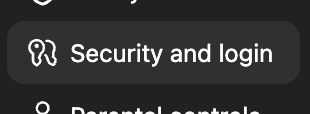
Open chatgpt.com/#settings/Security. The link opens ChatGPT's settings modal directly on the right tab. If the modal opens somewhere else, click Security and login in its sidebar.
-
Scroll to Secure sign in with ChatGPT and turn on Enable device code authorization for Codex.
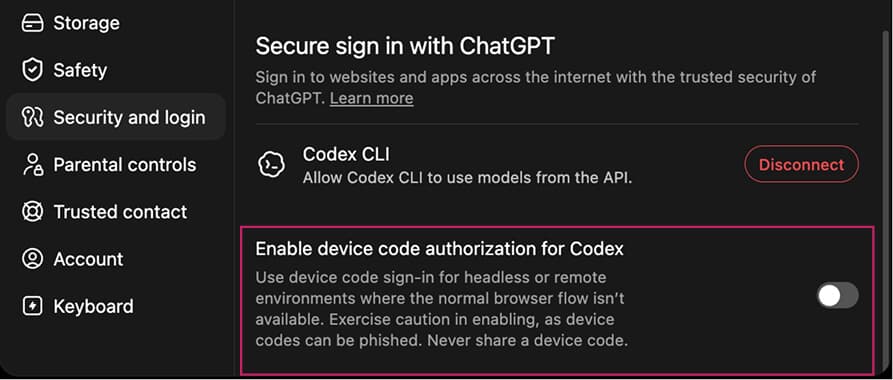
This is a one-time change on your OpenAI account, not a Solaris AI setting. You only repeat it if you later turn the toggle back off.
OpenAI's own warning is worth repeating: never share a device code with anyone. A code someone else sends you is a phishing attempt. The only code you should ever enter is one Solaris AI just generated and showed you on screen.
Connect it
You can start the same login flow from two places. Pick whichever you hit first.
From Connections (recommended)
-
Open Connections in the dashboard sidebar.
-
Expand ChatGPT under AI Models.
-
Click Sign in with ChatGPT.
-
Read the short privacy note, then click Continue with ChatGPT.
-
Copy the one-time code (or leave it on screen).
-
Click Open OpenAI to enter the code and finish authorization on OpenAI's site.
-
Come back to the Solaris AI tab. It picks up the authorization on its own, and the dialog turns into ChatGPT connected.
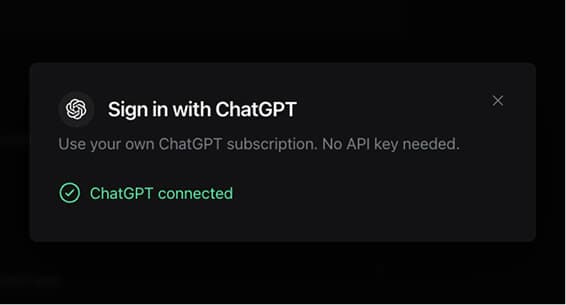
You should see a Connected badge on ChatGPT. Multiple sessions are labeled as sessions, not keys.
From an AI node
Open an AI node on the canvas. If no AI credential is available, the config prompt offers ChatGPT sign-in alongside Grok, OpenRouter, and Venice. Connect there, pick the new credential, then choose a model.
Reconnecting an expired session
ChatGPT sessions can expire. When that happens:
- Connections shows Session expired on that row.
- A run may say the ChatGPT session expired.
Click the pencil on the expired row (or Sign in with ChatGPT again) and complete the device flow. Reconnecting into the same credential keeps every AI node that already selected it working—you do not need to rewire workflows.
Use it
Drop an AI node, set AI Provider Key to your ChatGPT credential, pick a model from the live dropdown, and write a prompt. Downstream nodes read the reply as {aiResponse.data}.
The point of the AI node is not to write text. It is to put judgment between the data you pull and the action you take. Solaris AI Flow exposes more than 200 onchain operations across Solana protocols and data providers, including over 100 DeFi actions on Jupiter, Raydium, Orca, Meteora, Kamino, Phoenix, Sanctum, DFlow, and Pump.fun. The model reads the data those nodes return and decides what happens next.
Typical uses:
- Gate a swap on conditions. Pull a Jupiter quote and a Pyth price, ask the model whether the spread and slippage justify the trade, and let a Condition node route to a Jupiter swap or to nothing.
- Watch leverage. Read
getUserObligationsandgetLeverageMetricsfrom Kamino, have the model judge how close a position sits to liquidation, and alert on Telegram before it matters. - Rank what's new. Feed trending tokens from GMGN or Pump.fun into the model, score them against your own criteria, and place a Phoenix limit order on the survivors.
- Explain a fill. Turn a Phoenix or Raydium execution into a message a human can read, with the numbers that mattered.
Set responseFormat: json_object when a downstream node needs to branch on specific fields rather than read prose.
A model's judgment is not a safety guarantee. Trade nodes support dry-run mode, which simulates instead of executing. Keep new workflows in dry run until you have watched them decide correctly on real data.
Full node reference: AI. If a workflow template or credential gate asks for an AI provider, ChatGPT satisfies the same requirement as Grok, OpenRouter, or Venice for text models.
How it works
- You enable device code authorization on your OpenAI account, once. This is what permits a code-based sign-in at all.
- You start Continue with ChatGPT in Solaris AI.
- Solaris AI asks OpenAI for a short one-time code and a verification link.
- You open OpenAI's page, enter the code, and approve access.
- Solaris AI stores an encrypted session (not your password).
- When you run an AI node, the runtime uses that session to call models on your plan.
Enable device codes (once) → click Connect → one-time code → authorize on OpenAI → encrypted session → AI node runsWhile you are on OpenAI's page, Solaris AI keeps polling for the result, so the dialog flips to connected on its own once you approve. It survives a backgrounded tab or a brief network drop.
Nothing sensitive is shown in the browser except the code you type on OpenAI's site. The session is decrypted only at run time, the same way other credentials work. See Security for encryption details.
ChatGPT vs Grok vs OpenRouter vs Venice
| ChatGPT | Grok | OpenRouter | Venice AI | |
|---|---|---|---|---|
| Setup | Device login | Device login (or xAI API key) | API key | API key (+ funded Venice balance) |
| Best for | Fastest setup if you already use ChatGPT | xAI models on the Grok account you already have | Broadest model catalog (GPT, Claude, Gemini, etc.) | Private / open-source inference |
| Image generation in Solaris AI | No | No | Yes (image-capable models) | No (not wired in the AI node) |
| Billing | Your ChatGPT account | Your Grok account | Your OpenRouter balance | Your Venice balance |
Use ChatGPT when you want zero key management. Switch to OpenRouter when you need a specific commercial model, free-tier options, or image generation.
Limits and good to know
- One-time OpenAI setting required. Device code authorization must be on before the first sign-in. See Before you start.
- Text only in Solaris AI. Image output requires OpenRouter.
- Session can expire. Reconnect from Connections; your workflows keep the same credential id.
- Models depend on your ChatGPT account. The dropdown is live from your session—what you see is what you can run. OpenAI retires models over time, so a model saved on an old node can stop working; pick a current one from the dropdown.
- Reasoning is always on. Every ChatGPT model reasons on every call. You choose the depth, not whether it happens. See Reasoning.
- Temperature is ignored. Reasoning models don't accept a sampling temperature. Use OpenRouter or Venice to tune randomness.
- No password sharing. Authorization always happens on OpenAI's domain with a one-time code.
- Marketplace clones never include your ChatGPT session. Buyers connect their own account.
Troubleshooting
| What you see | What to do |
|---|---|
| "Your ChatGPT sign-in code expired. Start over." | The code timed out. Click Start over and authorize again while the new code is live. |
| "Could not start ChatGPT sign-in." | Most often the device-code toggle is off. Enable it at chatgpt.com/#settings/Security, see Before you start. Otherwise retry; if it keeps failing, try again in a few minutes. |
| OpenAI rejects the code, or the code page errors | Confirm Enable device code authorization for Codex is still on. Turning it off invalidates the flow. |
| "ChatGPT session expired. Reconnect it in Connections." | Open Connections → ChatGPT → reconnect the expired row (pencil or sign-in). |
| ChatGPT missing from the AI node credential list | Finish connecting under Connections, then re-open the node config. |
| "ChatGPT model ... is not available on your ChatGPT plan." | OpenAI does not offer that model to your account, usually because it was retired. Pick a different model from the dropdown; the suggested ones in the message always work. Saved nodes keep their old model until you change it. |
| Model list empty | Confirm the session is Connected (not expired). Reconnect from Connections, then re-open the node config. |
| A model you typed by hand fails | Pick from the live dropdown instead of typing a custom ID. The dropdown only lists models your account can actually run. |
| Need images | Connect OpenRouter and use an image-capable model on the AI node. |
| Want Claude / Gemini / free models | Use OpenRouter or Venice instead of (or alongside) ChatGPT. |
| Want Grok models | Connect Grok with the same kind of device login. |
Privacy and security (short version)
- You authorize on OpenAI's site; Solaris AI never collects your ChatGPT password.
- The session is encrypted at rest (AES-256-GCM with Cloud KMS), same as other credentials.
- Tokens are used only for runs you start.
- Credentials are not exported with workflows or marketplace listings.
More detail: Security and Credentials.
Next steps
- Connect other providers — Grok, OpenRouter, Venice, data APIs, messaging
- AI node — prompts, JSON mode, templates, and outputs
- Node reference — every swap, order, and lending action an AI node can gate
- Copilot — build workflows from a prompt
- Per-integration guide — where to get keys for every platform