
FOMO Terminal
Automate fomo.family trading on Solana. Read the live flow from the chain, buy in one click, copy a trader, let an exit ladder sell for you, and run rules as workflows.
FOMO Terminal reads every fomo.family trade on Solana straight from the chain as it lands. You watch the flow, buy from any row in one click from your own wallet, and let an exit ladder you choose sell the position for you. Copy trading follows a trader for you: their buy lands, yours goes out seconds later. Rules turn the things you watch for into workflows on your account.
Install it once from App Store → Automation. Installing creates no workflow and no schedule; the terminal opens with six panes along the top: Tape, Herd, Mine, Board, Copy and Rules. Search (top right) finds a trader by handle or a wallet or token by address.
Tape
The tape is every fomo.family buy and sell, newest first, about a second after it lands on chain. Each row shows the time, a green (buy) or red (sell) dot, the trader, the dollar size, the token and the amount, the router, and the token's herd score when it has one.
- Pin a token or a wallet to see only its trades. Min $ hides small fills, Named shows only traders with a fomo.family handle, and both / buy / sell filters by side.
- Hovering the list pauses it so rows stop moving under your cursor; new fills collect in a N new · resume button at the top.
- The stream pauses while the tab is hidden and catches up when you come back. If the connection drops, it reconnects and fills the gap on a best-effort basis, and says so.
- When the index has a coverage gap (it was not recording for a while), a note says so: fills inside a gap are missing everywhere in the terminal.
Herd
The herd pane ranks tokens that several fomo.family wallets are buying at once.
Score. For each token, the score compares how many distinct fomo wallets bought it in the chosen window with how many usually do (the average per window over the hour before), weighted by how many dollars they put in:
score = buyers in the window ÷ usual buyers per window (at least 1) × log10(10 + dollars bought)
A token needs at least five buyers in the window to be listed (the floor shown in the pane header). Pick the window with 1m / 5m / 15m / 1h. Scores are not comparable across windows, so changing it resets the trend lines.
| Column | What it means |
|---|---|
| Heat now | One to three pink bars: how hot the token is right now on the 1-minute window, whatever window the list is ranked on. Hot, hotter, hottest. The left pink rule on a row means hot now. |
| Buyers | Distinct fomo wallets that bought in the window, with the baseline beneath. |
| Bought | Dollars bought by fomo wallets in the window. |
| Score | The score above, with its last 60 seconds as a line (sampled every 5 seconds). It is not a price chart. |
| MC | Market cap, with the price change over the period you pick in Δ price. ~ means estimated from the last fomo trade, FDV means no market cap is known, and * means the figure is stale. |
| Since hot | The price change since the token last went hot, and how long ago. |
A score marked as an estimate has no recorded baseline (the index was not recording in the hour before). Nothing automatic acts on an estimate: no rule fires, no ladder reads it.
While your pointer or keyboard is on the list, its order is held so rows do not jump; a N new · apply order button appears when the ranking has changed. Click a row (or press Enter) to open the inspector beside the list: market data, the herd, 48 hours of fomo flow, named holders and first buyers, with the same trade buttons. On a row, B buys and S sells all (both follow Armed), the arrow keys move between rows, and Esc closes the inspector.
Presets and Armed
Every trade button uses your saved presets, so a click never asks for a size.
| Preset | Meaning |
|---|---|
| Buy size | SOL per buy, 0.1 to 5. The buy button shows it. |
| Slippage | The most the fill may differ from the quote, up to 20%. Above 10% a fill can be far from the quote. |
| Impact guard | Refuses the order, with nothing signed, when the executable quote would move the price more than this. On by default; off means it fills at any impact. |
| Exit strat | The exit ladder armed after each buy of yours fills (see below), or no exits. A strat never picks tokens and never buys: it only sells what you bought. |
| Armed | Off: the first click on a trade button turns it into Confirm for four seconds, and a second click trades. On: one click trades. |
The Herd pane can keep its own preset (for example a smaller size); until you save one it uses the default. Turn Armed on only when you mean it: every click on Buy, Sell 50% or Sell all then sends an order immediately.
A quick trade is one market order through Relay from your own Solaris AI wallet. It is recorded before it is broadcast and read back from the chain; an order not filled within 90 seconds is stopped and never retried. Each order must be worth at least $1, and there is a cap of 30 quick trades an hour and 200 a day.
Exit ladders
A strat is a ladder of up to six rungs, each one "sell X% of the lot when something happens". When a buy fills, the strat chosen in your preset arms a ladder on that lot, and the terminal watches it for a day.
| Rung | Sells when |
|---|---|
| Take profit | The price reaches a multiple of your entry (1.05x to 100x). |
| Stop | The price drops to a fraction of your entry (0.05x to 0.99x). |
| Trailing | The price falls a percentage from its high since you bought. |
| Herd sells | A number of the wallets that made up the herd have sold. |
| Herd faded | The herd score has stayed under a level for some minutes. |
| Top holders sell | A number of the token's 20 largest holders (when the ladder armed) sell a real part of their position. |
| Cabal sells | The cabal behind the herd (the wallets sharing its main referrer) sells more than it buys. |
| Time stop | A number of minutes pass without a fill. |
Rungs fire in order of what happens first. Stops and signals take precedence over take profits on the same moment. A slice that would be under the $1 minimum is carried to the next rung instead of selling everything. Sell all on a token cancels its ladder. Ladders expire after 24 hours.
Choose or build a strat from Presets → Edit → Choose. Templates are starting points to clone, not recommendations. While editing a strat, Test this strat on recent tokens replays it on tokens that turned hot (or hotter, or hottest) in a recent window, entered at that moment and also 5 and 15 seconds later. The heat and the window only choose which past tokens the test uses: they are not settings of the strat, and nothing is bought. It is recent behaviour on other traders' fills, not a forecast.
Positions and exits
The Positions panel floats at the bottom right of every terminal page. It lists your real positions (tokens the terminal bought for you, or with an exit still live) and your running simulated buys, each tagged Real or Sim, with the result now. Minimize it to a small pill that keeps the count and the real result in view.
Exit on a real position is a protected exit. When you press it, the terminal asks Relay what your whole balance would pay right now and sets a floor: that amount less your slippage preset. It then sells everything only at or above the floor. If the price has dropped under it, nothing is sold: the terminal checks again every second or two, and sells as soon as the price is back at the floor or above, for one minute. Each sale carries the floor itself, so a swap whose guaranteed output is under it is refused before anything is signed. If a minute passes with the price under the floor, nothing is sold and the row says so, with Sell at market if you still want out. Stop ends a protected exit still waiting. Market sells everything at once, within your slippage of the quote at that moment, with no floor and no waiting: use it when you want out at any price. Exit and Market follow Armed like every other trade button.
On a simulated buy, Exit follows the same rule on the replay: it sells everything at the first seller's price at or above the latest price less your slippage, within a minute, else nothing is sold and the strat runs on. Stop ends it at market, at the next seller's price. Neither costs credits, and a simulation never exits at a better price than a real exit would have.
Simulated buys
Paper trade, next to Buy on any token, "buys" the token with no money moving. The simulation enters at the latest buyer's price when you press it, with your preset's size and strat. Your strat then runs on the token's live fills, with the same rules as the historical preview, until it has sold everything or a day has passed. Each one shows under Simulated buys in Mine: the entry, the price now, the result in percent and in SOL at your preset size, and each rung with when and at what price it sold.
A simulation costs 10 credits, charged only when it starts. If it cannot start, nothing is charged, and the button says why: no buy of the token in the last minute to price the entry, ten simulations already running, or too few credits. If the answer is lost on the way back (a dropped connection), the button says unconfirmed: press Paper trade again and the same request is checked, never charged twice. Until it is settled (by your next press, or by Solaris AI checking on its own within minutes), its 10 credits stay set aside for it, so another simulation cannot spend them. Prices are fomo traders' own fills, with the fees they paid. They are not a quote for your order: a real buy goes through its own route, pays the Solaris AI swap fee and moves the price by its own size, so its result would differ. The SOL figure applies the percentage to your preset size and leaves out SOL's own move against the dollar. Top-holder and cabal rungs are not simulated and never fire here.
Mine
Mine is your wallet as the chain sees it. It shows the terminal's tokens by default; All wallet tokens lists everything else in the wallet too. For each token: its price and value, your entry and unrealized result, and the same trade buttons. Entry is the average cost of what the terminal bought for you; tokens bought elsewhere show no entry. Beneath it are your ladders (each rung and its state), your simulated buys, your exits, and your quick trades with their outcome: sending, confirming, filled, not sent or failed, each with its transaction.
Board
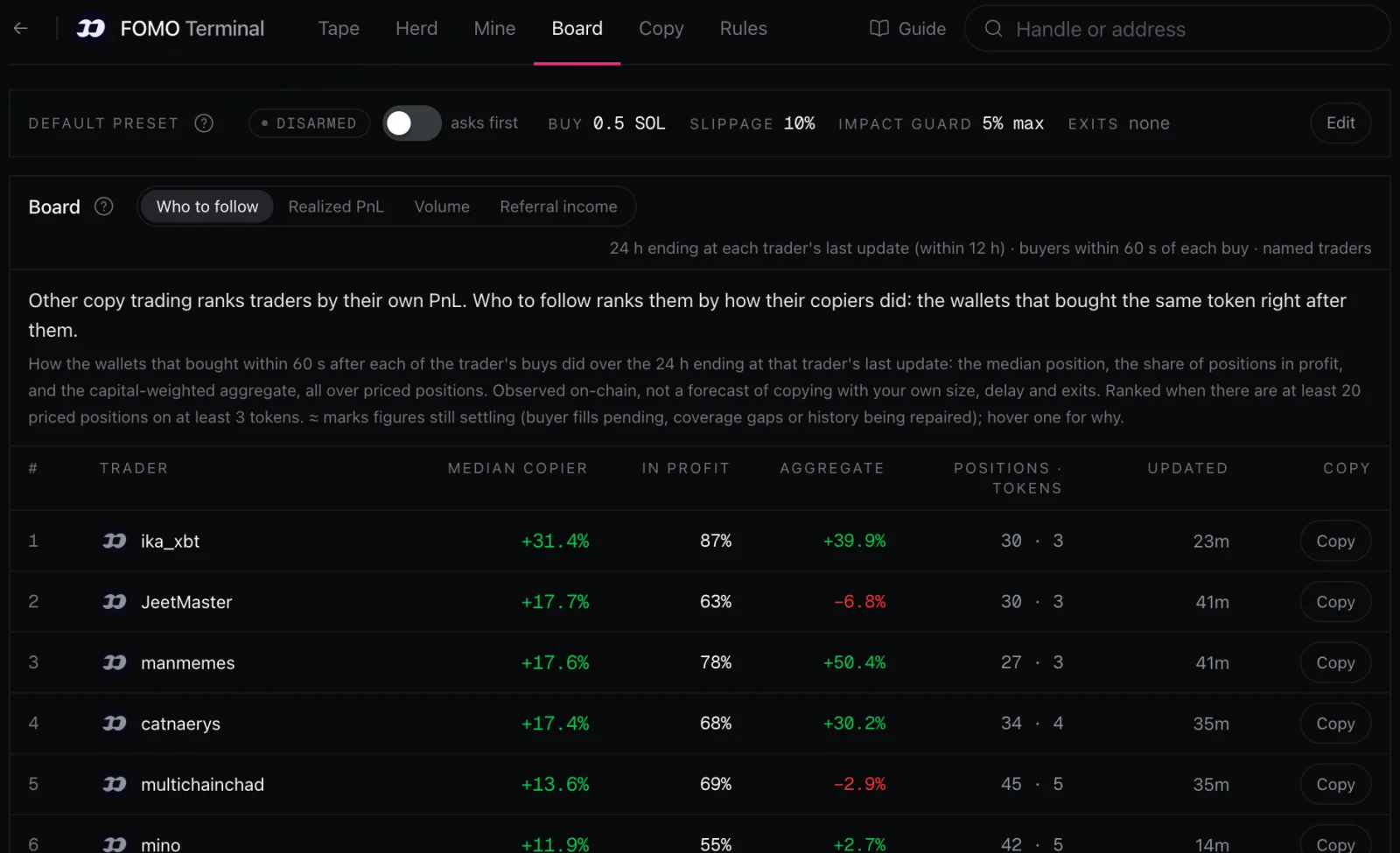
- Who to follow: other copy trading ranks traders by their own PnL. This board ranks named traders by how their copiers did: the wallets that bought the same token within 60 seconds after their buys, over the last 24 hours, by the median position, the share in profit, and the capital-weighted aggregate. A trader is ranked once there are enough priced positions on enough different tokens; thin or single-token samples are listed below, unranked.
≈marks a figure still settling; hover it for why. These are observed results, not a forecast of what copying a trader would earn. Each row has a Copy button (see Copy trading). - Realized PnL, Volume and Referral income rank named fomo wallets over 24 hours, 7 days or since the index started. Realized profit is booked per UTC day, so its shortest period is today and yesterday.
Copy trading
Copy trading follows one fomo.family trader for you. When they buy a token, your Solaris AI wallet buys it too, within seconds of their fill landing on chain, at the size you chose. Your exit strat is armed on your fill, and if you want, you sell when they sell.
Other copy trading ranks traders by their own PnL. FOMO Terminal ranks them by how their copiers did: the wallets that bought the same token right after them. That ranking is Who to follow on the Board, and it is where a copy should start.
Start a copy
1. Pick a trader worth copying. Open Board → Who to follow. Each trader is ranked by the median result of their copiers, the wallets that bought the same token within 60 seconds after their buys, with the share of copiers in profit and the sample behind it. Press Copy on a row.
You can also press Copy trader at the top of any trader's page, or open the Copy pane, press New copy and type a fomo handle or a wallet address.

2. Check their record, then set your terms. The form opens with how the trader's copiers did at the top: their rank on Who to follow, the median copier's result, the share of copiers in profit and the sample (or that they are not on Who to follow). Below it, your default preset is filled in. Change what you like:
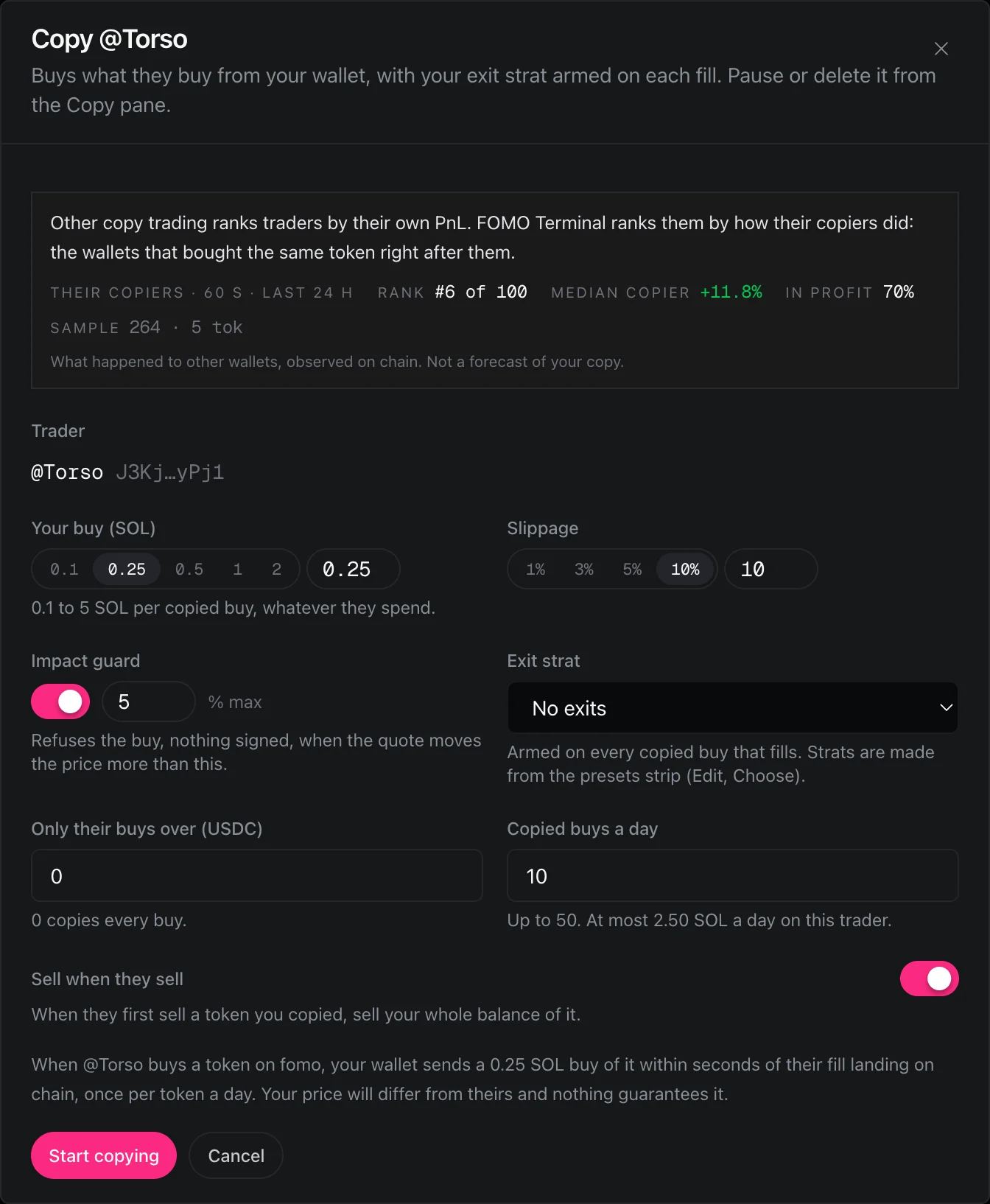
| Setting | What it does |
|---|---|
| Your buy (SOL) | How much SOL each copied buy spends, 0.1 to 5. It is your size, whatever the trader spends. |
| Slippage | The most your fill may differ from the quote, up to 20%. |
| Impact guard | Refuses the buy, with nothing signed, when the quote would move the price more than this. Off means it buys at any impact. |
| Exit strat | The exit ladder armed on every copied buy that fills (see Exit ladders), or no exits. |
| Only their buys over (USDC) | Copies only the trader's buys above this size. 0 copies every buy. |
| Copied buys a day | 1 to 50 (10 by default), counted per UTC day. The form shows the most SOL this copy can spend in a day. |
| Sell when they sell | When the trader first sells a token you copied, your whole balance of that token is sold. |
3. Press Start copying. Copies trade while you are away, so the first time Solaris AI asks you to authorize signing from your wallet. The copy shows Syncing for a few seconds while it reaches the index, then Copying. Keep enough SOL in your wallet for the buys you allowed.
What happens when they trade
They buy. Your wallet sends the same buy within seconds, and your exit strat is armed once it fills. A buy is skipped when:
- you already copied that token in the last 24 hours (a trader buying in chunks is copied once; if your buy was refused or never filled, their next buy of it is copied),
- their fill is more than 30 seconds old by the time it reaches the terminal,
- it is under your Only their buys over size,
- the copy has used its copied buys for the day,
- they already sold the token again.
They sell (with Sell when they sell on). Your whole balance of the token is sold, once per copied buy, up to five minutes after their sell. Only tokens the copy bought are sold. If your buy is still landing, the sale waits for it; if it never fills, nothing is sold. Like Sell all, the sale keeps the token's ladder until it fills and then closes it.
Your exit strat keeps working as usual, so a ladder rung can sell before the trader does.
Watch and manage your copies
Open the Copy pane to see every copy and what it has done.
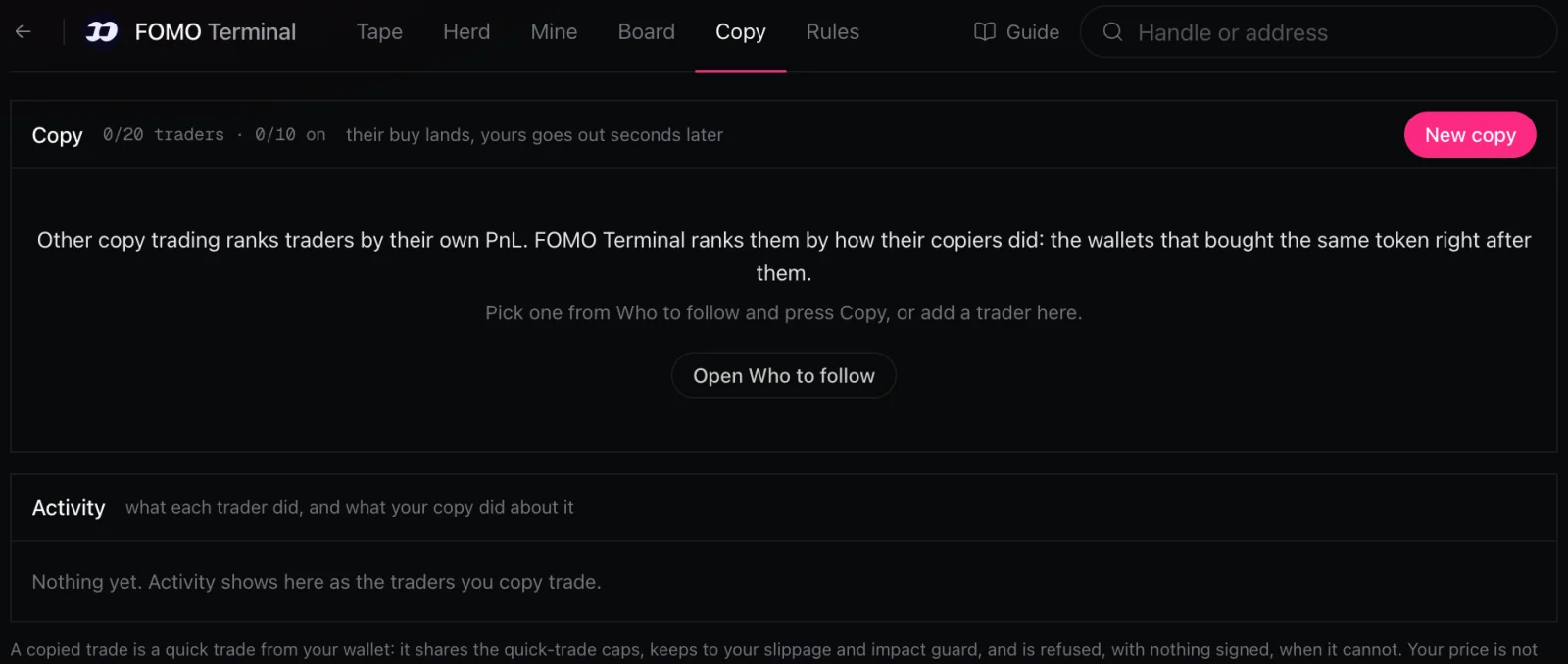
Each copy shows Copying, Syncing or Paused, with today's copied buys against its daily limit, its last activity, and how the trader's copiers are doing now, so you can see when a trader stops being worth copying. Its switch pauses or resumes it; Edit changes its terms and Delete removes it. Pausing or deleting stops any trade the copy has not sent yet.
Activity lists each trade of the traders you copy and what your copy did about it, with the transaction:
| Status | Meaning |
|---|---|
| placing | The order is being prepared. |
| sending, confirming | The order is on its way to the chain. |
| filled | Your trade went through. |
| skipped | Not copied, with the reason (for example more than 30 seconds late, or already copied today). |
| refused | Not sent, with the reason (for example the impact guard or a cap). Nothing was signed. |
| not sent, failed | The order did not land. |
Limits
- Every copied trade is a quick trade: one market order through Relay from your own wallet, at least $1, stopped and never retried if it is not filled within 90 seconds.
- Copied trades count toward the same 30 quick trades an hour and 200 a day as your one-click trades, and show in Mine with them.
- Up to 20 copies, 10 of them active, one per trader wallet.
- A strat used by a copy cannot be deleted.
Your price will differ from the trader's. Your order goes out seconds after theirs, through its own route and at your size, often after their buy has already moved the price.
Rules
A rule is a workflow on your account that runs when something on fomo.family happens. Create one from the Rules pane, or from the bell button on any row (it opens the form prefilled).
| Rule | Runs when |
|---|---|
| Trader | Any of up to 50 wallets buys or sells, above a size you choose. |
| Token | Any fomo wallet trades up to 20 tokens, optionally only named wallets. |
| Cabal | Anyone whose referral share goes to a wallet trades. |
| Herd | A token's herd score crosses a threshold, once per cooldown. |
A rule reports each match to your own Telegram bot or Discord webhook from Connections. Rules are live only: a match runs its workflow about a second after the fill lands, and nothing is replayed. You can have 40 rules with 20 active (10 of them herd rules). Each rule runs at most 60 times a minute (a digest replaces the rest) and 2,000 times a day, with 5,000 a day per account. Each match uses run credits.
Token and trader pages
Every token and trader name links to a page of its own.
- Token: market data, 48 hours of fomo flow, the herd and its hot history, holders, first buyers, top traders and the token's own tape.
- Trader: a Copy trader button, on-chain profit since the index started next to fomo.family's published numbers, the buyers-after panel (what wallets that bought right after this trader did), open positions, the referral cabal, follower flow and recent fills.
- Cabal: who pays referral share to a wallet, and whom it pays.
Costs
Watching is free. Each quick trade, including every copied trade and every rung a ladder sells, pays the standard Solaris AI swap fee inside the swap and uses no run credits; see Apps → Cost. Each rule match uses run credits. Each simulated buy costs 10 credits when it starts; one that cannot start is free.
Risks
Memecoins move fast and most go to zero. The herd shows where fomo wallets are buying, not where the price is going; Who to follow and the strat preview describe the recent past, not the future, and copying a trader does not copy their results. Exit ladders sell at market when a rung fires and can fill far from the trigger in a thin market. Only trade what you can afford to lose.